
P999 Game Download APK Update Version in Pakistan 2026

Description
Mobile gaming has grown rapidly, giving smartphone users quick access to casual entertainment anywhere they go. P999 Game is one of the names that frequently appears in searches related to mobile gaming and reward-based platforms. Whether you came across the app through social media or are simply curious about how these platforms work, understanding the basics before downloading anything is always a smart move.
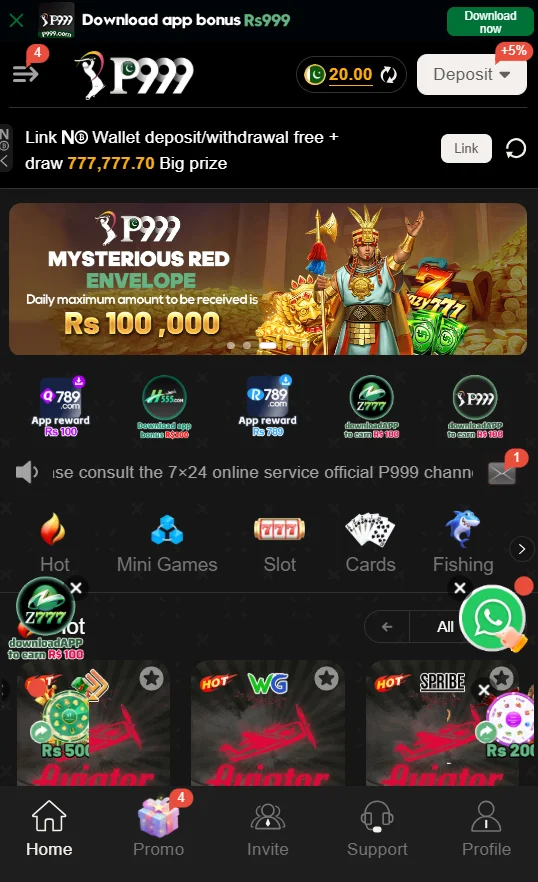
In this guide, you will learn what P999 Game is, how the platform generally operates, and what features users typically look for. We will also walk through the standard installation steps for Android devices, share practical safety tips, and look at the realistic pros and cons so you can make an informed decision.
What Is P999 Game?
P999 Game is an online gaming platform designed primarily for mobile users who enjoy short, interactive digital games. Rather than focusing on a single long-term storyline or complex console-style gameplay, platforms like this usually bring several mini-games together inside one lightweight Android app.
The main purpose of the platform is to provide quick, accessible entertainment on smartphones. Depending on the version and regional availability, users may find casual activities such as number challenges, color-based rounds, spin wheels, or simple lottery game formats. Some users also explore it as an earning app because certain game modes or promotional tasks may advertise in-app rewards. However, any reward opportunities depend heavily on platform rules, activity requirements, and chance, meaning it should be viewed strictly as casual entertainment rather than a reliable source of income.
Key Features of P999 Game
When exploring the P999 Game APK or similar mobile gaming platforms, users generally look for specific design and usability elements. Keep in mind that exact features can vary depending on app updates and the source you use.
User-Friendly Interface
The platform is designed around a straightforward layout with clearly labeled sections and visible buttons. Beginners can usually find the home screen, game categories, and profile settings without needing prior technical experience.
Different Gaming Options
Instead of offering just one title, P999 Game groups multiple mini-games into a single application. Users can switch between quick prediction rounds, spin-style activities, and other casual formats based on their personal preferences.
Smooth Navigation
Clear menus and simple tabs help players move between the main dashboard, game rooms, and account settings with minimal confusion. This streamlined structure makes it easier to jump into a short session during free time.
Mobile Compatibility
Because it is built primarily as an Android app, the software is tailored for touchscreen controls and smaller screens. Lightweight APK packages are generally aimed at running smoothly across a wide range of modern and mid-range smartphones.
Easy Account Registration
Getting started typically involves a basic sign-up screen where new users enter standard details like a mobile number or username and set a password. Completing registration usually takes only a few minutes if your internet connection is stable.
Account Management
Once logged in, users can access a dedicated profile or wallet section to view their account details, check activity history, and review available balance or bonus terms. Having these tools in one place helps players keep track of their usage.
Customer Support
Many online gaming platforms include a help or support section where users can look up basic rules or reach out regarding login and account questions. Response times and available channels, such as in-app chat or messaging links, depend on the active support team.
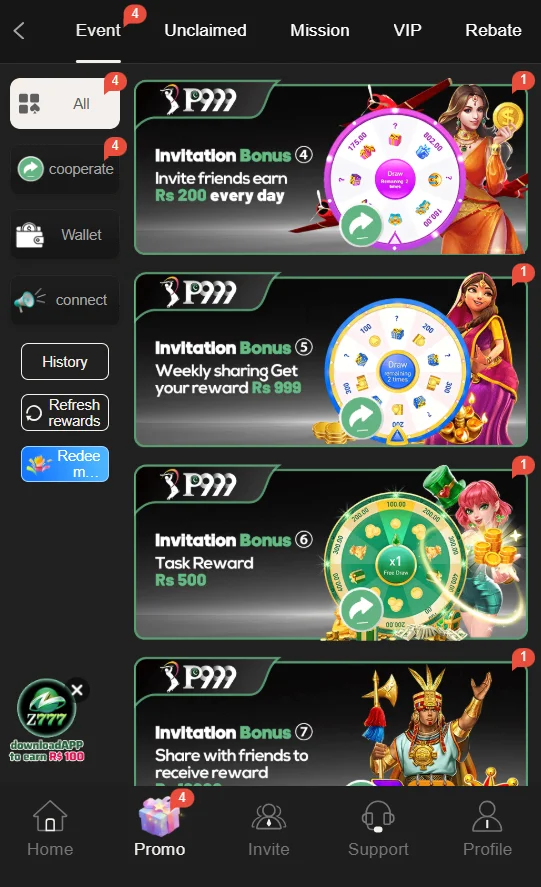
How to Get and Install P999 Game
Because many third-party gaming platforms are distributed outside standard app stores, users often install the P999 Game APK manually on Android devices. Follow these general steps carefully:
Visit the Official Website
Open your mobile browser and navigate to the verified official website or a trusted, reputable source that hosts the platform. Double-check the web address to avoid fake or copycat pages.
Find the Download Button
Look for the official download link or button on the homepage. Check the listed file size and version number to ensure you are getting the current release.
Download the APK File
Tap the download button and wait for the APK file to finish saving to your phone. Avoid interrupting the download so the installation package does not become corrupted.
Enable Unknown App Installation (if required)
If your Android phone blocks installations from outside the Google Play Store, open your device Settings, go to Security or Apps, and allow Install Unknown Apps for your web browser. You can turn this setting off again after installation.
Install the Application
Open your phone’s File Manager or browser Downloads folder, tap the downloaded APK file, and select Install. Wait a few moments for the setup to finish.
Open and Register Your Account
Locate the new app icon on your home screen and open it. Tap the register option, enter the required information, set a strong password, and review the platform terms before completing your profile.
Safety Instructions and Tips
Installing third-party apps and using online gaming platforms requires extra caution. Keep these practical safety habits in mind:
- Download from trusted sources: Only download APK files from verified official pages to reduce the risk of modified or harmful software.
- Create strong passwords: Use a unique password that combines letters, numbers, and symbols, and never reuse passwords from your email or banking apps.
- Protect personal information: Share only the basic details required to register, and never give out one-time passwords (OTPs) or verification codes to anyone.
- Check app permissions: Review what the app asks to access during installation. A basic game should not need access to your contacts, private messages, or unrelated personal files.
- Avoid suspicious links: Do not click on random promotional links shared by strangers in messaging apps or unverified comment sections.
- Understand payment policies: If the platform includes deposits, withdrawals, or promotional bonuses, read the terms, minimum limits, and processing conditions carefully before taking part.
- Set a gaming budget: Decide in advance how much time and money you are comfortable spending, and never spend funds meant for daily essentials.
- Play responsibly: Treat every game as entertainment. Outcomes in chance-based games cannot be predicted, so avoid chasing losses.
Pros and Cons
Looking at both the strengths and limitations of the platform helps set realistic expectations before you install it.
Pros
- Simple, beginner-friendly design: Clean menus and straightforward controls make it easy to explore without a steep learning curve.
- Variety of short games: Multiple mini-games are available in one app, offering quick entertainment during short breaks.
- Lightweight mobile access: Designed for Android smartphones, making it accessible on many everyday devices.
- Quick account setup: Registration and navigation generally require minimal steps.
Cons
- Not available on official app stores: Manual APK downloads require extra care to avoid unsafe or altered files.
- No guaranteed earnings: Games involving chance or rewards do not guarantee financial returns, and users can lose money if they spend carelessly.
- Changing features and terms: Game availability, promotional rules, and payment options can change without notice.
- Limited iOS support: Because it relies on an Android APK package, iPhone users often cannot install it directly.
FAQs
You can download the installation file by visiting the official platform website through your mobile browser and tapping the verified APK download link.
Yes, this Game is primarily designed for Android smartphones and is typically distributed as an Android Package Kit (APK) file.
Download the APK file from a trusted source, allow Install Unknown Apps for your browser in your Android settings if prompted, open the file from your Downloads folder, and tap Install.
Downloading and installing the APK file is generally free. However, certain in-app game modes or features may involve optional deposits or specific participation rules.
Because the platform relies on an Android APK file, it is not natively supported on iOS devices unless the provider offers a separate, verified web version.
Conclusion
P999 Game offers a simple, mobile-friendly space for users who enjoy short casual games and quick digital entertainment on Android devices. With its straightforward interface, variety of mini-games, and simple setup process, beginners can easily understand how the platform works. At the same time, downloading third-party APK files and interacting with reward-based platforms always requires careful judgment. If you decide to try it, stick to trusted download sources, protect your personal data, read all platform terms carefully, and keep your gaming habits balanced and responsible. Try s555 game for more fun.
Download links
How to install P999 Game Download APK Update Version in Pakistan 2026 APK?
1. Tap the downloaded P999 Game Download APK Update Version in Pakistan 2026 APK file.
2. Touch install.
3. Follow the steps on the screen.