
SQ 777 Game Download Free Latest Online Earning APK 2026

Description
The SQ 777 Game is a mobile-first Android platform created for casual slot and card gaming. Instead of relying on web browsers or desktop setups, the developers structured the platform entirely around mobile device performance.
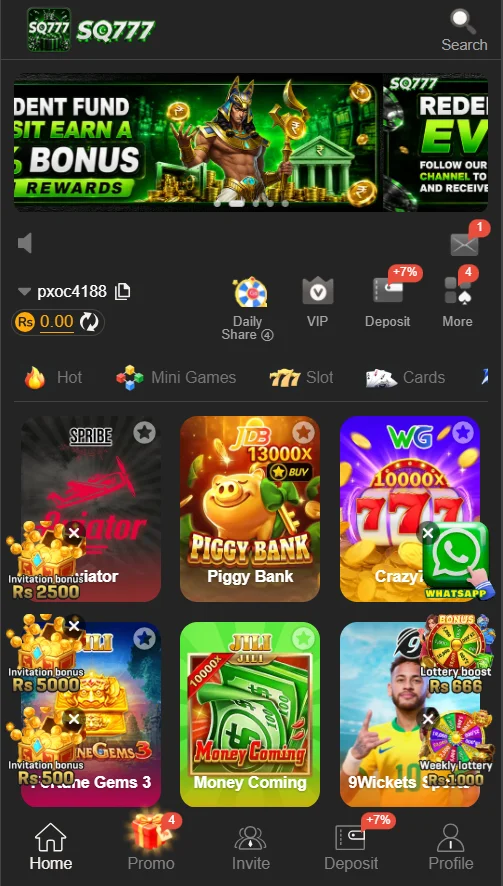
Pakistani mobile gamers often seek apps that combine accessible game choices with simple layout designs. The SQ 777 Game targets this segment by offering small file sizes, low system resource usage, and clean dashboard routing. While promotional channels often frame these apps around reward opportunities, users should treat the app primarily as a form of casual digital entertainment rather than a guaranteed source of income.
Understanding How SQ 777 Game Works
The application operates on an integrated client-server system optimized for Android touchscreens. Once installed on a device, the client connects to remote game servers that manage round results, wallet state updates, and session data in real time.
Core Platform Mechanics
- Random Outcome Engines: Game rounds—such as slot spins or card reveals—rely on automated backend algorithms. No strategy, pattern-tracking, or app modification can guarantee consistent winning outcomes.
- Unified Account System: A single profile maintains your settings, active session stats, and digital wallet balance across all available titles inside the app.
- Session Synchronization: Continuous data exchange ensures your account status remains current as long as your device has a stable internet connection.
What Can Users Explore Inside the App?
Understanding the interior features of the application helps new players navigate the software smoothly right from their first launch.
Main Dashboard and Navigation
The main dashboard displays game options through a single scrollable grid. Category filters located near the top of the interface let you sort available titles without waiting for full page reloads. Essential tools like your profile settings, help desk access, and wallet balance sit anchored at the edges for easy one-thumb tapping.
Available Gaming Categories
- Digital Slot Rooms: Visual reels featuring traditional three-reel layouts, progressive themes, and varied spin animations.
- Classic Card Tables: Virtual card games that pit players against automated dealers or live match participants.
- Arcade Mini-Games: Short-session interactive titles designed for quick rounds without lengthy setup periods.
Account Features and Settings
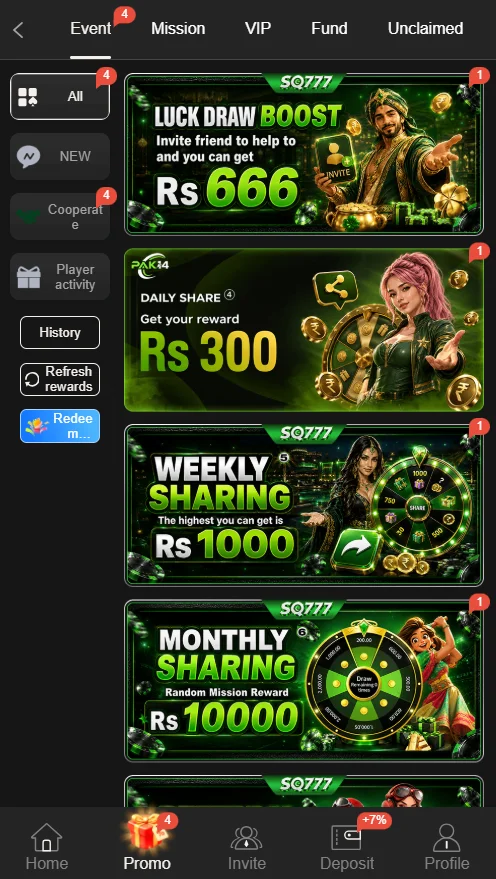
Inside the account panel, users can view past match history, adjust sound or visual options, manage verification details, and inspect active promotional balances.
Mobile User Experience
The app features responsive scaling to handle various smartphone display resolutions. Graphics are optimized to minimize battery consumption and CPU heat, allowing mid-range and entry-level Android devices to run the game without major frame drops.
SQ 777 Game Download Guide for Android
Because SQ 777 Game is distributed primarily as an Android Package (APK) file, users must source the file manually rather than fetching it through standard desktop installers.
Pre-Download Checklist
- Android Version: Verify your smartphone runs Android 5.0 or newer.
- Free Storage: Ensure at least 150 MB to 200 MB of clear internal storage space for the installation package and temporary cache files.
- Internet Connection: Connect to a stable Wi-Fi network or 4G data connection to prevent package corruption during the download process.
- Source Verification: Download the file exclusively from verified, reputable web sources or the official developer destination. Avoid unknown forum links or modified APK copies.
Installation Process and First-Time Setup
Installing third-party software on Android requires granting specific temporary system permissions. Follow these step-by-step instructions:
- Download the APK File: Tap the download link on your verified source website and wait for the
.apkfile to save to your device’s Downloads folder. - Adjust Device Settings: Open your phone’s Settings, navigate to Security (or Apps & Notifications), and enable Install Unknown Apps for your default web browser or File Manager.
- Locate the Installer: Open your File Manager app, find the newly downloaded installer file, and tap it to begin setup.
- Confirm Permissions: Read through the prompt permissions displayed by Android before selecting Install.
- Launch the App: Once installation finishes, open the application from your app drawer and allow it to initialize its local configuration files.
Creating an Account and Accessing Your Profile
Setting up a fresh profile ensures your preferences, statistics, and wallet state stay linked to your identity.
Step-by-Step Profile Registration
- Open the installed SQ 777 Game application.
- Select the Register or Sign Up button located on the splash screen.
- Input an active mobile phone number that can receive SMS text messages.
- Create a strong password mixing letters and numerical digits.
- Enter the One-Time Password (OTP) sent to your mobile phone to verify your registration.
Profile Access & Security Practices
When logging in on returning sessions, tap Login, enter your credentials, and complete any visual verification challenges. Keep your login credentials private, never share your verification codes with anyone, and enable secondary authentication options inside the settings menu when available.
Payment Methods and Transaction Information
Mobile apps in Pakistan often incorporate local wallet options for account management. Transaction features and rules can change over time, so players should inspect the in-app cashier tab directly before initiating transfers.
Available Deposit Options
Users who choose to fund their in-app balances can select from domestic mobile wallet gateways. Most deposit flows clear within a few minutes when bank networks are operating normally.
Withdrawal Process
To request a cashout of eligible balances:
- Navigate to the Cashier or Wallet tab inside the dashboard.
- Choose your preferred payout method.
- Input the payout amount within the platform’s stated minimum and maximum limits.
- Confirm your registered mobile wallet details and submit the withdrawal request. Processing times vary based on server queue levels and payment provider network status.
JazzCash and Easypaisa Availability
The SQ 777 Game integrates support for local Pakistani channels, specifically JazzCash and Easypaisa. Using a mobile phone number registered directly to your own JazzCash or Easypaisa account helps prevent transaction delays and account matching errors during payouts.
Things to Check Before Using SQ 777 Game
Taking proactive precautions safeguards your personal data and smartphone health. Review these factors prior to active play:
- File Safety Check: Run downloaded APK files through an updated mobile security scanner before running the installer.
- App Update Status: Ensure you are running the latest application version; outdated builds may encounter server disconnects or payment errors.
- Data Privacy Policies: Read the platform’s terms of service regarding how user phone numbers and transaction logs are stored.
- Budgetary Limits: Decide on strict personal entertainment spending caps before placing any stakes.
- Official Communication: Rely only on built-in customer service chats or official channels for support; avoid third-party agents requesting fees.
Benefits and Possible Limitations
Benefits
- Optimized interface crafted specifically for Android mobile devices.
- Supports familiar Pakistani payment gateways like JazzCash and Easypaisa.
- Low system hardware requirements allow smooth operation on budget phones.
- Small file footprint saves device storage space.
Possible Limitations
- Third-party APK installation requires manual permission management and source checking.
- Real-money play involves inherent financial risk with no guaranteed returns.
- App layouts, features, and wallet rules may change abruptly during software updates.
- Performance depends heavily on external internet speed and server latency.
Frequently Asked Questions
The app is distributed as an independent APK package through third-party web sources. You must download and install the software manually on Android devices.
No. All games depend on random outcome mechanics. Outcomes cannot be predicted or guaranteed, and players should expect varying results.
Check your internet connection first. If your local wallet shows the transaction completed but your in-app account does not reflect it within 15–30 minutes, contact the internal customer support desk with your transaction ID.
The SQ777 Game is designed primarily for the Android operating system. iPhone users should check official platform releases to see if web or iOS versions become available.
Use a unique password, never share your OTP code or login credentials with anyone, and refrain from logging into your account on shared public devices.
Final Verdict
The SQ 777 Game offers a responsive, lightweight option for Pakistani mobile users seeking casual slot and card-style entertainment on Android. Its compatibility with local digital wallets like JazzCash and Easypaisa makes account management straightforward.
However, users must maintain realistic expectations: financial outcomes are never guaranteed, and downloading APK files requires careful attention to source security and device protection. Always download from reputable sources, protect your account credentials, and play responsibly.
Download links
How to install SQ 777 Game Download Free Latest Online Earning APK 2026 APK?
1. Tap the downloaded SQ 777 Game Download Free Latest Online Earning APK 2026 APK file.
2. Touch install.
3. Follow the steps on the screen.